

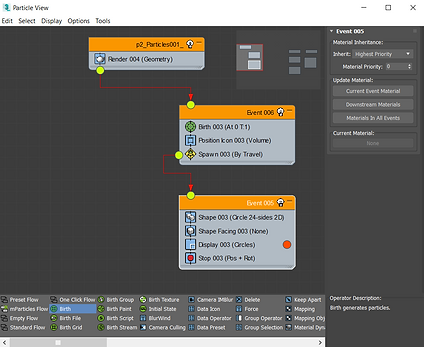
PARTICLE VIEW

USED TO DRAW TITLE SCREEN CIRCLE
PARTICLES - DRAWING IN MAX
Going into the project, there was one thing I was really unsure whether or not I would be able to do, so I was very pleased to find a tutorial online that outlined exactly what I needed. Unfortunately, that the tutorial is no longer online! I will do my best to show the steps you need to take to animate "drawing" using particle emitters in 3ds Max.
-
Create a PF Source object
-
In the Modify Tab, Open Particle View
-
Add Empty Flow (This is your emitter, PF Source 001)
-
Add Birth Event (Event 001), and link PF Source 001 to Event 001
-
In Event 001:
-
Change Birth Emit Stop to 0, Amount 1, Total 1
-
Delete Display (Ticks)
-
Add Position Icon
-
Check "Lock On Emitter"
-
-
Add Spawn
-
Check Travel By Distance
-
-
-
Add Shape Event (Event 002), Link Event 001 to 002
-
In Event 002:
-
Adjust Shape as desired
-
Add Shape Facing to point particles in desired direction
-
Add Material Static if you want to change material
-
Add Stop, and check Stop Type Position and Rotation
-
Now this Particle System will display a small flat object whenever it moves a small distance via animation. By linking this emitter to the tip of the laser controller object of the player rig, an effect of drawing on the walls can be created when the laser is animated to follow the surface of the wall.